In Your Line of Sight
In 2020, while the world was facing a major pandemic, the Bahamian Banking industry was facing a major shift. While customers could no longer come into the branch for regular transactions, online transfers significantly increased by 660% in a few short weeks. At Commonwealth Bank, we went from processing a daily average of 150 to roughly 1,000. To make matters more complicated, the Central Bank of The Bahamas changed the mandate on online transfers and increased the workload tenfold.
The Landscape Before
Banks in The Bahamas used two methods to transfer funds: RTGS, which was instant, and ACH, which processed in batches at set intervals throughout the day. ACH was relatively new, so transfers were grouped under generic descriptions for ease. For my bank, that meant roughly 300–400 transfers a day, all labeled the same way.
The use of generic descriptions allowed us to process the transfers more quickly by not having to type the description more than once. We also had a program that allowed us to process batch transactions more quickly than manually typing them. We would format the information into an Excel template and import it into the program. This would allow us to process hundreds of transactions in seconds rather than minutes, manually typing them.
Smaller batches were faster to type manually than to build a template for. Larger batches we loaded into the program. At the time, with a single description, other banks would send these transfers as a group. 100 entries to one batch.
What the Pandemic Changed
The COVID-19 pandemic meant that the typical Banking experience was shifting. Banks had mandated that customers would not come into the branch for transactions that could be handled online or through the ATMs. That meant that a lot of reluctant customers were signed up for online banking, and the online transfer volume saw a spike from an average of 150 a day to nearly 1,000. As transfers were still being processed manually or through fast batch processing, this just meant less manual posting.
The volume spiking alone was manageable. We had the fast batch program. We could handle more transfers. What we couldn’t handle was what the Central Bank did next.
How the Central Bank Responded
Some customers were not fond of the generic descriptions, as they could not identify who the transfers were from. This led the Central Bank of The Bahamas to mandate all banks to ensure that the sender’s name was in the description for all transfers going forward. What this looked like on the back end was that, where previously there were 100 transfers to one batch, there was now one entry and 100 batches, each with a unique description of the sender’s name. Our old process for fast batch processing was not going to work.
The time it would take to copy each of those transfers from each page, along with their descriptions, would have taken longer than to manually process them. Our work increased tenfold. The team of three data processors complained on the floor, worked overtime, and still got the work done. However, I knew this wasn’t going to be sustainable long-term. We needed a fix, or we were going to be burned out a lot sooner than expected.
Our Internal Solution
Our major issue was the way the information was received. We only had the raw data in the form of a PDF. We didn’t know of a way to transform that into something we could edit reliably. Then a former team member showed us how. You save the PDF and, in Adobe Reader, save the file as text. Next, you open Microsoft Excel and open the text file through Excel. This was the first and major hurdle completed. Next was extracting the transfers in a consistent manner.
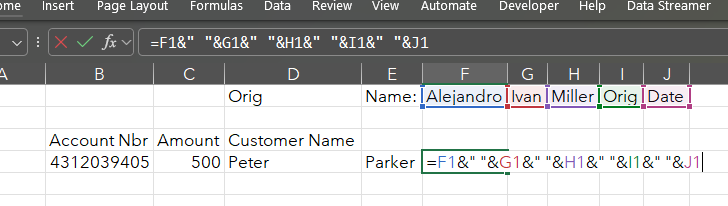
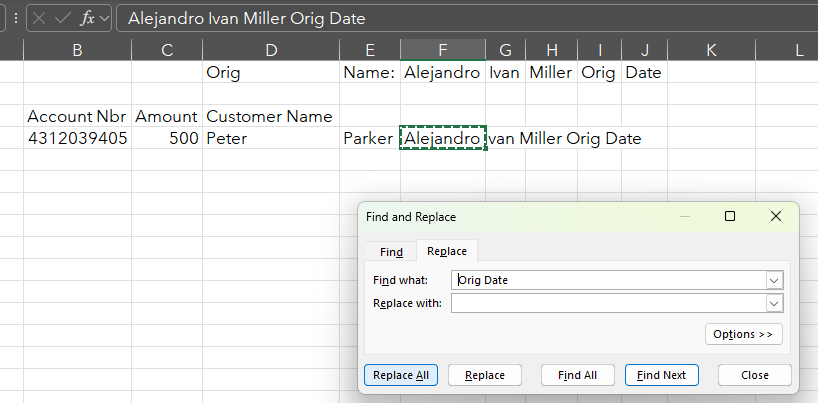
We worked with one bank’s transfers at first and found that all transfers had a unique code despite being on different pages. We could isolate the transfers from other entries being sent. Next, we needed to combine the sender’s name. Another coworker showed me a concatenate formula that combined the text from various cells and placed them all in one place. Sender’s names could be found in up to 5 cells across in the same row, so we would use a concatenate formula like =E5&” “&F5&” “&G5&” “&H5&” “I5. From there, we would then copy the formulas and save them as values, so they remained text and didn’t change as we removed other rows or columns. For the names that only took up between one and four cells, we would then have to clean the text to only show the sender’s name. The additional text would always be the same, so using Find & Replace would remove the unwanted text.
Now the information was in a format that could be placed in the Excel template for fast batch processing. We could single out the pages we needed, place the amount, account, & sender’s name on the same line, then filter for the lines we need and then copy it over to the Excel template for fast batch processing and make the final edits before sending it through the program for batch posting.


Testing a Process That Could Be Trusted
This was the first test, and it worked. Now this needs to be tested. Yes, it worked once, but will it always work? Can this process be trusted every time to get it right? Next was shifting this from one bank to another. They each had a slightly different approach to sending transfers, which meant we needed a different strategy for each. Could this framework work for each with minimal tweaks and adjustments?
We didn’t present this solution to management yet. We didn’t even use it for fear of inaccuracy. If we managed to process a payment twice because the process was flawed, that risk was too great to bear. When I had a moment between work, I would test the process against new sessions to test its accuracy. To my amazement, it worked. It was accurate each time at identifying the correct entries, and the descriptions with the sender’s names were attached to the correct entries.
I used this process alone. I would take all the transfers and post them through this process, saving my team time throughout each day. Once I started to feel comfortable with the process, I mentioned it to management. To my surprise, they were accepting of the process. As there were no errors, the risk was minimal and improved the accuracy of the posting, as the amounts and account numbers were no longer being typed manually but extracted from the source file. They asked me to document the process and to teach the other team members about it.
Documentation, Implementation, & Training
This was entirely new to me: documenting a process. I understood the process technically, and now I had to translate it in a way that others would need to understand and be able to reproduce. Each bank required a different document, as each process had variations from the others. I spent the following weeks continuing to post the transfers and creating these documents.
When I presented them to management, I made sure that my coworker was recognized, as the entire process was only possible because of what they presented to me: the original template. Without that, I don’t think I could have done what I did. We were later recognized through the bank’s “In Your Line of Sight” program for significantly changing or improving a bank process.
Next was training the other Data Processors in the process, also something of a first. I now had to speak to others; I had to test if what I had created in the documents could be followed with no involvement from myself, and produce the desired results every time. To my surprise, they grasped it easily. A few small clarifications and they were pros in no time. I guess I created a sound document, as it is still used today by the new team of Data Processors, making transfer posting easier.
More important to me at the time than being recognized was knowing that in some way we were making sure that customers were getting their money on time despite internal changes and challenges. During the pandemic, you never knew if one of those transfers was the difference between someone having groceries that day or other essential matters. The daily customers’ reliance on online banking transfers meant we were important in everyone else’s day-to-day business.
Later, the Bank’s IT department reviewed the process I had created and incorporated the process in a new system upgrade.
The Data Professional Underneath
I didn’t know it then, but the whole process we created was a part of the ETL (Extract, Transform, and Load). This is one of the key elements that Data professionals perform, and I was doing it without knowing the term. A simple version that showed the principle behind the process. Extract: Saving the PDFs as text and opening them in Excel. Transform: Using concatenate formulas, merging sender’s names and cleaning out extraneous text, and filtering out all other transactions. Load: The clean transfer information being pasted into the batch posting template, ready to be posted.
Another Data professional task that we tackled was data lineage. I could trace the posted entry back to the source PDF. I could trace any issues by following the data through each step of the process. Then comes Data Quality Assurance. All the testing before actually presenting the process, making sure it was accurate and repeatable.
The recognition through the program was lovely, and getting to create this process and learn new skills I didn’t know I had was remarkable. But the real takeaways lie elsewhere. They were the teammates who could finally manage the workload. The customers who still got their transfers on time, in a season when you never knew what a delayed payment might cost someone. And the future colleagues who would inherit a process that didn’t depend on overtime to function. This was worth doing for them, keeping them in the line of sight.
Any data shown in screenshots is illustrative and does not represent real customer or transaction information.
Disclaimer: The views expressed in this article are my own and do not reflect the official policy or position of my employer or any of its affiliates.